Friday April 17, 2026
Login
Register
- Home
- Extensions
- S5 Flex MenuSubline Possible
 Drop Down Menu
 Menu Module ExamplePublish Any Module to Any MenuThis is a sample module to showcase the functionality of the S5 Flex Menu system. This menu system contains up to 40 module positions and you can publish any module to any of these positions under any menu item.
 Grouped Child MenuGroup Children Together
- Features
 S5 Vertex Framework
 Template FeaturesPowerful Template Settings
 J! StuffDefault Joomla Items
 Style and Layout OptionsCustomize Your Site
- Tutorials

- Details
11
Dec
- Download the installation package from our download section.
- Once the download is complete go to the backend of Joomla.
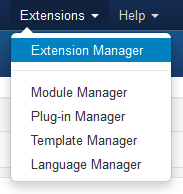
- Navigate through your menu system to Extensions/Install Uninstall.
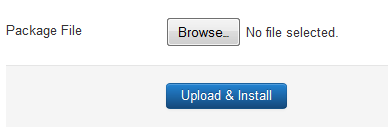
- Once at the installation screen click the browse button and navigate to where you downloaded the template file.
- Once you have the file selected click 'Upload File and Install'
- Navigate through your menu system to Extensions/Template Manager.
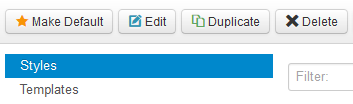
- Find the radio button next to the newly installed template.
- Click on the Default button at the top right of the screen and you're done!
The template is now installed, now let's set it as the default template:
S5 Accordion Menu
Quick Menu
Advertisment

Our Mag Sponsors
Lorem ipsum dolor sit amet, Phasellus adipiscing lobortis nulla ut egestas. Etiam et dolor neque, adipiscing lobortis nulla ut egestas et aliquet nulla. Phasellus adipiscing lobortis nulla ut egestas.


About Us
Lorem ipsum dolor sit amet, Phasellus adipiscing lobortis nulla ut egestas. Etiam et dolor neque, et aliquet nulla. Phasellus adipiscing lobortis nulla ut egestas. Etiam et dolor neque, et aliquet nulla. Lorem ipsum dolor sit amet, Phasellus adipiscing lobortis nulla ut egestas.
6399 North Wells Road
Bigtownville, CO, USA 12345
Phone: 800-123-4567
Email: This email address is being protected from spambots. You need JavaScript enabled to view it.
Web: shape5.com/demo
6399 North Wells Road
Bigtownville, CO, USA 12345
Phone: 800-123-4567
Email: This email address is being protected from spambots. You need JavaScript enabled to view it.
Web: shape5.com/demo
Phasellus adipiscilobortis
 Lorem ipsum dolor sit amet, Phasellus adipiscing lobortis nulla ut egestas. Etiam et dolor neque, et aliquet nulla. Phasellus adipiscing lobortis nulla ut egestas.
Lorem ipsum dolor sit amet, Phasellus adipiscing lobortis nulla ut egestas. Etiam et dolor neque, et aliquet nulla. Phasellus adipiscing lobortis nulla ut egestas.
Lorem ipsum dolor sit amet, Phasellus adipiscing lobortis nulla ut egestas. Etiam et dolor neque, et aliquet nulla. Phasellus adipiscing lobortis nulla ut egestas.
Lorem ipsum dolor sit amet, Phasellus adipiscing lobortis nulla ut egestas. Etiam et dolor neque, et aliquet nulla. Phasellus adipiscing lobortis nulla ut egestas.
Lorem ipsum dolor sit amet, Phasellus adipiscing lobortis nulla ut egestas. Etiam et dolor neque, et aliquet nulla. Phasellus adipiscing lobortis nulla ut egestas.